01
Tenders
Log every invitation and addendum, then score go or no-go before you price it.

Ordin is the business system for commercial subcontractors. Quotes, jobs, variations and progress claims share one record, and your own AI assistant can do the admin inside it.
Built with subcontractors we already work with








Each line reads from the one above it. Nothing is typed twice.
Tender, quote, job, variations and claims live in one record that the whole team works from.
Your own AI assistant can log the tender, draft the quote and line up the bookings, under your name.
Budget, cost to complete, margin and what you are owed, without a month-end spreadsheet.
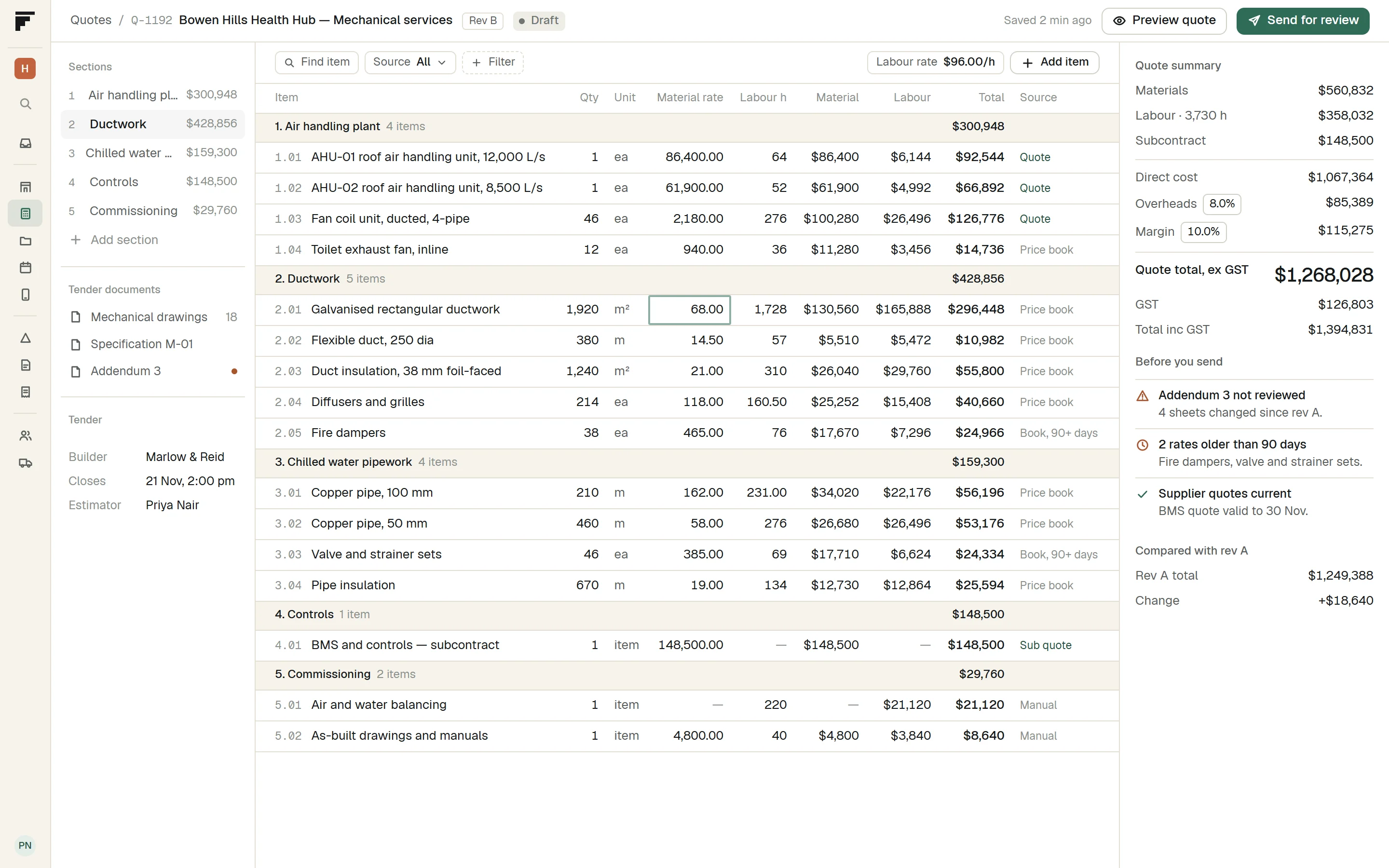
Log every invitation and addendum, score go or no-go, and price the quote from your own rates. When the documents change, recut the quote and keep the history.
| Addendum 1 | 6 Nov | Allowed for |
| Addendum 2 | 11 Nov | Allowed for |
| Addendum 3 | 13 Nov | Not yet read |
| Distance | 90 of 100 |
| Builder | 80 of 100 |
| Value | 100 of 100 |
| Time to close | 60 of 100 |
| Workload | 50 of 100 |
| Section | Total |
|---|---|
| Air handling plant | $300,948 |
| Ductwork | $428,856 |
| Chilled water pipework | $159,300 |
| Controls | $148,500 |
| Commissioning | $29,760 |
| Direct cost | $1,067,364 |
| Overheads 8% | $85,389 |
| Margin 10% | $115,275 |
| Quote total, ex GST | $1,268,028 |
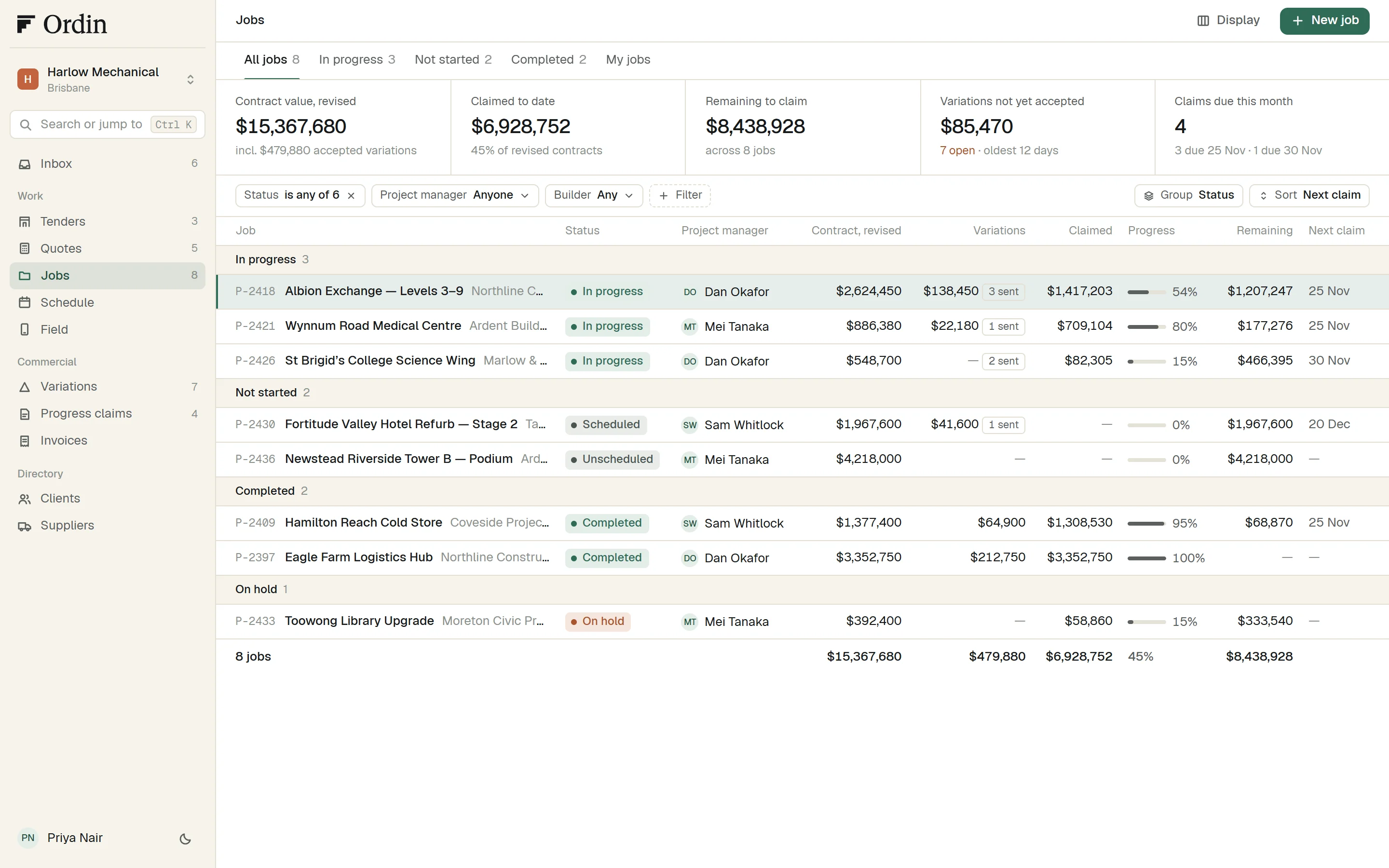
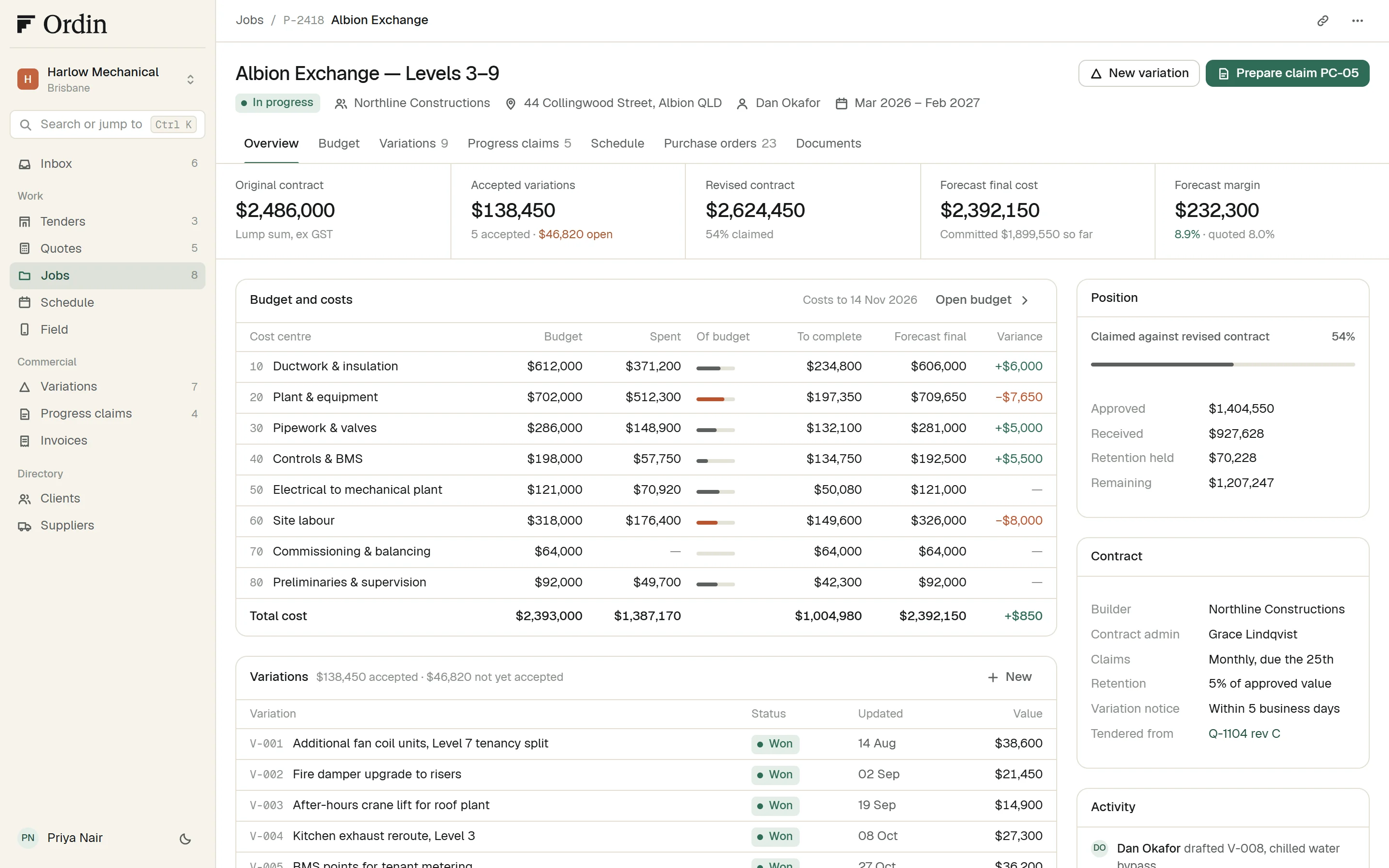
Each job carries its budget, spend and forecast by cost centre. Variations are priced, sent and followed until the builder accepts them.
| Cost centre | Budget | Forecast final |
|---|---|---|
| 10Ductwork & insulation | $612,000 | $606,000 |
| 20Plant & equipment | $702,000 | $709,650 |
| 30Pipework & valves | $286,000 | $281,000 |
| 40Controls & BMS | $198,000 | $192,500 |
| 50Electrical to mechanical plant | $121,000 | $121,000 |
| 3 more cost centres | $474,000 | $482,000 |
| Total cost | $2,393,000 | $2,392,150 |
| DOCheck M-201 rev D against installed duct | 13 Nov | Overdue |
| SWConfirm delivery of chiller valves, PO-0231 | 17 Nov | Open |
| DOPrice V-008, chilled water bypass | 18 Nov | Open |
| PNPrepare progress claim PC-05 | 25 Nov | Open |
| Variation | Status | Value |
|---|---|---|
| V-004Kitchen exhaust reroute, Level 3 | Won | $27,300 |
| V-005BMS points for tenant metering | Won | $36,200 |
| V-006Acoustic lagging to Level 9 boardroom duct | Sent | $12,480 |
| V-007Relocate condensate drains, Level 4 | Sent | $9,640 |
| V-008Chilled water bypass for staged handover | Draft | $24,700 |
| V-009Ceiling access panels, Level 5 | Lost | $6,200 |
Book work by tech or crew and see the week at a glance. Techs get their jobs on a phone, offline if they need to, and their hours land on the job.
Prepare each progress claim against the revised contract, line by line, less retention. Work in progress and margin by job come from the same records.
| Claim | Status | Claimed |
|---|---|---|
| PC-02August 2026 | Issued | $331,900 |
| PC-03September 2026 | Issued | $402,450 |
| PC-04October 2026 | Approved | $434,253 |
| PC-05November 2026 | Draft | $318,600 |
| Job | Revised | Margin | Margin fade |
|---|---|---|---|
| Albion Exchange | $2,624,450 | 8.9% | −0.1 pts |
| Wynnum Road Medical | $886,380 | 7.7% | +1.8 pts |
| St Brigid’s College | $548,700 | 9.6% | +0.4 pts |
| Hamilton Reach | $1,377,400 | 8.9% | −0.4 pts |
| 4 jobs | $5,436,930 | 8.8% | +0.2 pts |
Connect your own Claude or ChatGPT. It works with the access your role has, and everything it does is listed under your name. Ordin has no AI of its own.
Log the Bowen Hills tender from this email, then draft the quote from the takeoff I attached.
Log every invitation and addendum, then score go or no-go before you price it.
Budget, spend and forecast by cost centre, from the quote that won.
Claim line by line against the revised contract, with retention tracked.
Priced from your own rates, and recut when the documents change.
Priced, sent and followed until the builder accepts them.
Book the week by tech or crew. Techs see the day on their phone.
Also in the plan
Log the invitation, track addenda, score go or no-go.
Price from your rates. Recut when the documents change.
The accepted quote becomes the budget, by cost centre.
Book the work. Techs see it on their phone.
Price the change and follow it until it is accepted.
Claim against the revised contract, less retention.
| Role | Costs and margins | Sell prices | Works on |
|---|---|---|---|
| Owner | Margin by job, work in progress, what you are owed | ||
| Admin | Users, settings and month close | ||
| Estimator | Tenders, rates and recuts | ||
| Office | — | Invoices, payments and the schedule | |
| Tech | — | — | Today's work, on a phone |

Connect once, review once, cut over once. Clients, sites, contacts and jobs move today from the CSV files you export, and more record types are planned.
Join the waitlistOur staff cannot see your records unless an Owner lets one named person in, for 14 days, and can end it at any time.
What a person or their assistant does is listed under their name.
An Owner can take a full export of every record and original document.
Bring a live tender or job. We set Ordin up around it, so the first week is real work.
You talk to the people building the product, and what you need shapes what gets built next.
We move your clients, sites, contacts and jobs across and check them with you before cutover.
Join the waitlist and tell us how many people and locations you run. We will price a plan for you.
Join the waitlistWhat Ordin does today, what it does not, and how your records stay yours.
Australian commercial subcontractors: HVAC and mechanical, electrical, fire, plumbing and other specialist trades. It covers tendering to builders, jobs on contract paid by progress claim, and service and maintenance work.
It replaces your job system: tenders, quotes, jobs, schedule, purchasing, progress claims, invoices, maintenance and reports. It does not read drawings or do takeoff. Your assistant can turn the takeoff file you already produce into a draft quote.
Connect once, review once, cut over once. You export CSV files from your current system and we do the move with you. Clients, sites, contacts and jobs move today. More record types are planned.
Ordin has no AI of its own. Each person connects their own Claude or ChatGPT, which works within that person’s role. Everything it does is listed on the Agents timeline under their name. It can propose a booking, and a person confirms it. Only a person can approve or send a quote.
Roles are fixed: Owner, Admin, Estimator, Office and Tech. Owner, Admin and Estimator see costs and margins. Office sees sell prices, not costs. A Tech never sees costs or sell prices.
Not unless you let us in. An Owner grants Support Access to one named staff member for 14 days. They show on your Users list, every action is audited, and the Owner can end it at any time.
An Owner can take a full organisation export: every record, with your original documents, as ZIP files. Owners and Admins can also make API keys so another system can read your clients, sites, jobs and quotes.
Register for the waitlist with your work email. Ordin has not launched yet. We are opening to 20 businesses first, and we will email you when a place opens.